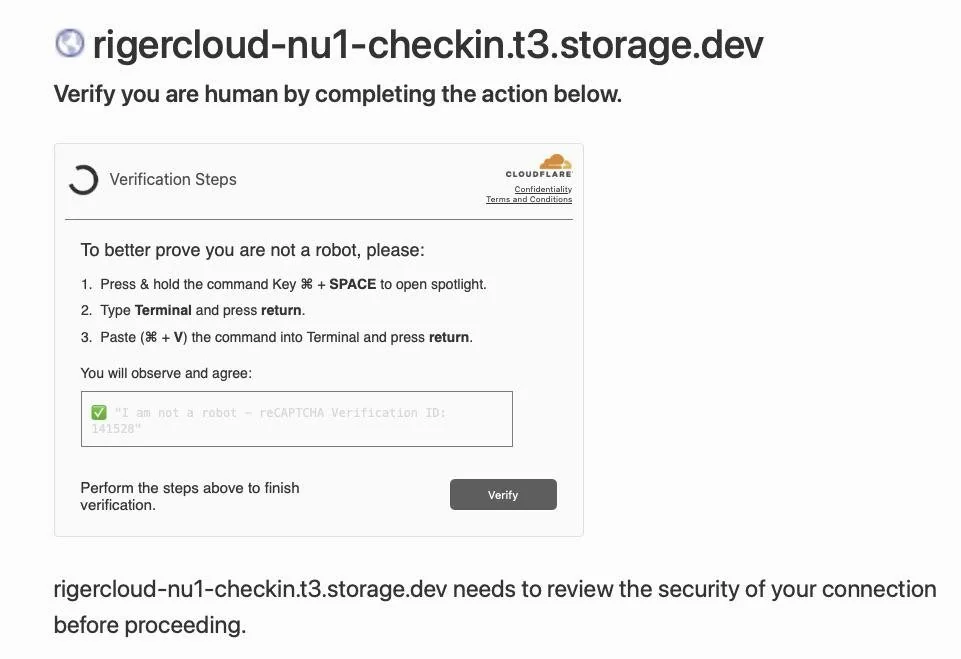
AppleInsider published a blog post yesterday (March 10) reporting that hackers have recently launched a new attack method called “ClickFix,” which tricks Mac users into installing malware through a fake human verification page.
According to the blog post, victims who visit compromised websites or click on malicious ads are shown a fake CAPTCHA page. Unlike regular image recognition or checkboxes, this page instructs users to open the system’s built-in “Terminal” tool and paste a seemingly complex command to complete the “verification.”
Once the user executes these commands, malware will be silently downloaded and installed on the device, thereby stealing browser credentials, cookies, and cryptocurrency wallet data.
Security researchers point out that the number of ClickFix attacks detected surged by more than 500% between 2024 and 2025, making it one of the fastest-growing social engineering threats on the internet.
Early attacks primarily targeted Windows systems, but variants have now emerged specifically for macOS, and some can even automatically display customized commands based on the user’s system.
This type of attack is difficult to defend against because it utilizes legitimate system tools (such as terminals) rather than custom malicious loaders; this technique is known as “exploiting built-in system tools”.
Traditional security software typically focuses on downloading suspicious files, while ClickFix allows users to execute code, thus bypassing many defense mechanisms based on download behavior. Because the system struggles to distinguish between legitimate maintenance and malicious operations, macOS security protections often fail to intercept commands executed intentionally by the user.
Experts emphasize that identifying such scams is very simple: any verification prompt that asks users to open a terminal or PowerShell and paste commands is malicious. Legitimate human verification systems will never ask users to perform such operations. The safest approach when encountering such pop-ups is to simply close the page.